Ok, great, but why?
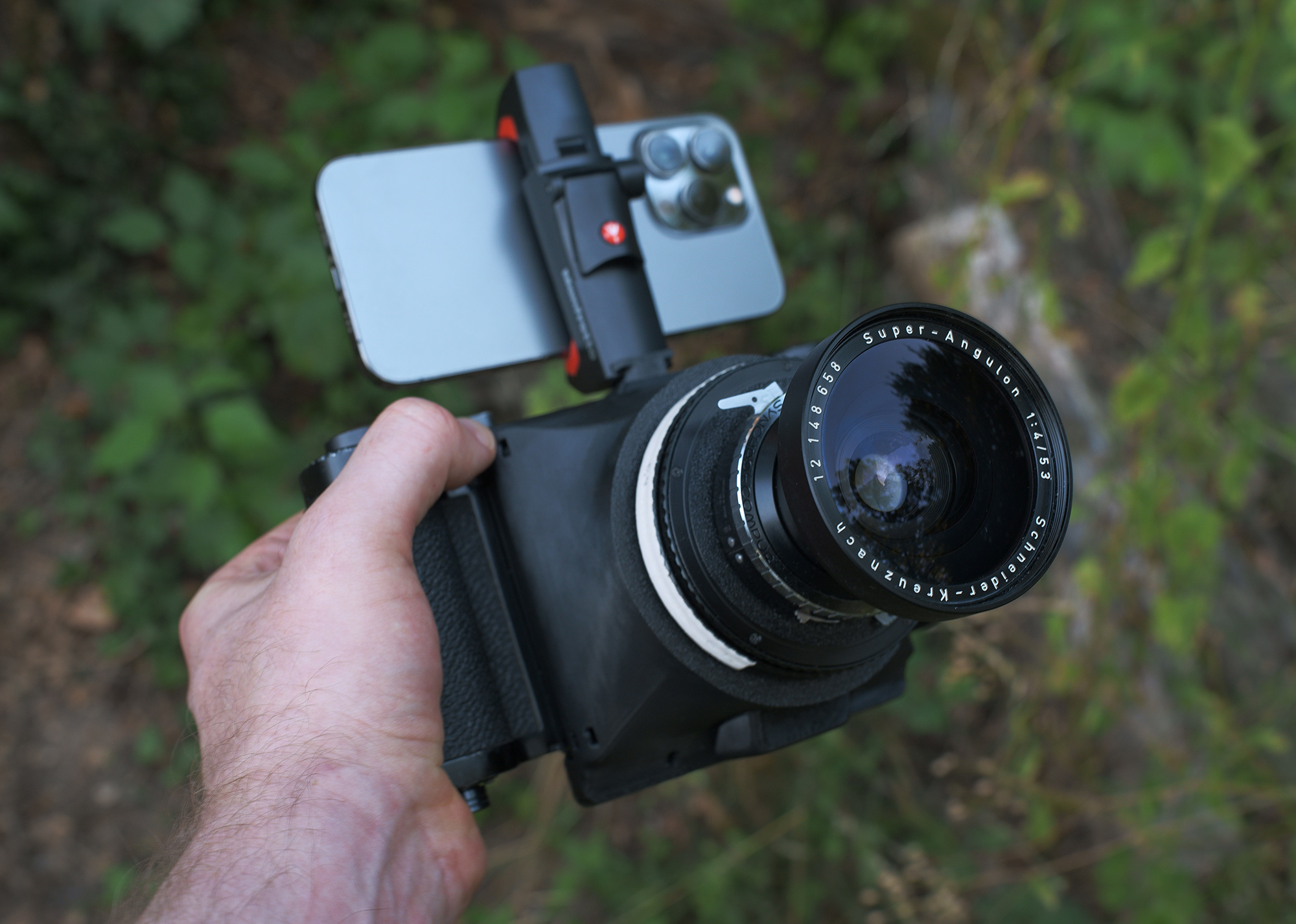
Recently I've build a custom camera - simply by combining a Schneider Angulon 53mm f4, a Mamiya Press back, and a customized 3d printed cone. It's fun to use, but framing and focusing with this thing was not easy. And slowing down to measure exposure was also annoying - the camera was meant to be more of a medium format point-and-shoot. So I developed the app, specifically to solve these pain points, but then...
..but then I found myself using the app more and more just on the go - to plan a shoot, or to see what lens I would need to bring, and if the light in the evening scene is strong enough for an ISO 100 film. The app also shows very clearly the depth of field at specific aperture settings and film formats - a very helpful tool in my fight against the eternal urge to shoot wide open all the time..
The app is free to use - the light meter, the framing tools and the LiDAR distance measurement cost nothing and have no time limit. A single optional purchase unlocks the rest. More on that further down.
Three tools in one app
rangefinder, light meter, viewfinder
Depth visualisation
Two ways of measuring distance:
Set a distance, and everything at that distance lights up. Pre-set your camera lens to the same distance, and you immediately know what is in focus.
OR
Place a point by tapping the screen, and you'll see the distance towards that point.
Light meter
Set the ISO, and the app gives you the correct exposure settings. Aperture priority or shutter priority - you choose by setting the other value.
Place a point on the screen, and now you have a spot meter - it automatically adjusts the settings to correctly expose the chosen area.
Film format viewfinder
Pick a format and a focal length, and the frame lines change according to your choices. See how you want to compose your frame. Fifty-three formats available, from Super 8 to XPan to 20x24 inch.
A live preview of your depth of field!
A Pro feature, on a LiDAR-equipped iPhone.
Look, actual depth of field preview!
Based on aperture, film format, focal length and distance, the app calculates what will be in focus, and highlights it with a zebra pattern.
Fifty-three formats
Select any format as your viewfinder preset. 35mm full frame and 6×6 are free; the other fifty-one come with Pro.
35mm
Full Frame, Half Frame, Cine, Panoramic, Sprocket
Medium Format
645, 6x6, 6x7, 6x8, 6x9, 6x12, 6x17, 6x24
Large Format
4x5, 5x7, 8x10, 11x14, 16x20, 20x24
Panoramic
XPan, 6x12, 6x17, 6x24, large-format panoramics
Digital
Full Frame, APS-C, APS-H, Micro Four Thirds, Digital Medium Format
Professional Cinema
Super 8, Super 16, Super 35, ALEXA 35, ARRI Large Format, VistaVision, 65mm, IMAX 15/70
Helpful features.
All of these are part of the one-time Pro unlock.
Switch to the ultrawide iPhone lens for the wide focal lengths that won't fit the normal iPhone lens. LiDAR / rangefinder still works in the middle of the frame. Honestly that feature was a bitch to build.
Mount the iPhone on your camera and set the lens offset (distance between the camera lens and the iPhone lens). Frame lines shift to compensate for the parallax between the two lenses, based on the distance you set. That you see the correct framing, even at close range.
See the scene in monochrome to preview your black & white shot. It's a good approximation of how a panchromatic film will render the same scene.
When you save a frame, the chosen exposure, distance, format, and focal length get written in a strip along the bottom - so when you're in the darkroom a week later, you'll still know your settings.
The default light meter calibration works well. Still, you can calibrate the light metering in the settings to match your professional light meter.
Tap a subject, and the measurement point stays on it while your camera moves around. It does not track moving objects, but points in space.
The horizon line uses the motion sensors to stay level as you tilt it. It tries to show where the real horizon is, even when it is outside the frame. To avoid the crooked horizon shots, you know.
Zebra colors, crosshair styles, frame styles, grid overlays, opacity. Adjust all of it.
Made for you.
Large and medium format photographers
Use the app to quickly see how you want to position your heavy camera, how you want to frame your shot, which lenses to choose and whether that ISO 100 film is actually enough.
Cinema and pre-production
It's a director's viewfinder, but with DoF visualization and a light meter built in! Very helpful when scouting locations, composing shots, and getting the right lens selection before the shoot.
Learning photography
Play around with the settings: aperture, focal length, film format. Immediately see the in-focus zone change based on your input. It's the quickest way to build intuition for camera settings and for the relationship between film format, focal length, aperture and depth of field.
3D-printed camera builders and users
As fun as 3D-printed film cameras are, (and they are fun!) they often lack a good way to reliably frame the shot and get the focus right. Light & deep solves it.
Free & Pro.
The app is free to use. One optional purchase unlocks the rest - there is no subscription.
Free
€0 no account, no ads, no time limit- Reflective light meter with aperture and shutter priority
- 35mm full-frame and 6×6 frame overlays
- Focal-length control
- LiDAR distance measurement, tap-to-measure and target-distance zebras on supported hardware
Pro
One-time a single in-app purchase, not a subscription- Depth-of-field visualization on supported hardware
- All 53 formats
- Spot metering and light-meter calibration
- Reference photos with settings and metadata
- Fixed-point distance tracking
- Ultrawide camera support on compatible devices
- Black-and-white view and virtual horizon
- Frame, zebra and crosshair customization
- Parallax correction for a phone mounted on a camera
- Cinema tools: shutter angle, project frame rate and anamorphic squeeze
FAQs
What does it cost?
The app is free to download and use. The light meter, the 35mm and 6×6 frame overlays, focal-length control and LiDAR distance measurement stay free, with no account and no time limit. Everything else - the depth-of-field preview, all 53 formats, spot metering, reference photos and the rest - is unlocked by Pro, a single in-app purchase. Not a subscription.
How far does the LiDAR reach?
About five meters - that's the limitation of the sensor. And that's the range where a rangefinder matters most: portraits, still life, macro, close-quarters documentary.
Does the depth display work in ultrawide (0.5x)?
Partially: LiDAR coverage is limited to the center of the ultrawide frame, and a small parallax offset is visible at close distances. Honestly a miracle I got it to work at all - no other app I know of offers LiDAR rangefinding at 0.5x.
What devices does it run on?
Any iPhone on iOS 17.6 or newer. The light meter, viewfinder, and framing tools run on all of them. The LiDAR features - depth overlay, spot distance meter, depth-of-field preview - need an iPhone with a LiDAR scanner: iPhone 12 Pro or 12 Pro Max, or a later Pro model.
How accurate is the light meter?
Like other light meter apps, it calculates ISO, shutter speed, and aperture based on the camera sensor readout. Think of it as a reflective meter, comparable to metering on a modern digital camera. If pre-set calibration doesn't match your external light meter, you can adjust the calibration offset in the setting for each iphone lens.
Is it useful for cinema or video work?
Yes. Well, I should hope so. There are 11 cinema formats, from Super 8 to IMAX 15/70, and the frame saving feature was built primarily with cinematographers in mind. I talked to a few DoPs already and am open to suggestions on how to improve the app for that use case. Reach out to me if you have any feedback!